Computer
Repertories – A Comparison
by Chris Kurz, 1997
No warranty as to the correctness of
information is given.
Check with the respective company for up-to-date information.
[If you are impatient and want to cut to the
chase right away, why not skip ahead to the summary?
– Ed.]Courtesy Homeopathy-on-line
So there I was.
One carelessly uttered sentence on the Internet
Homeopathy Mailing List, and suddenly I saw the challenge clearly
looming ahead. I couldn’t turn back without losing face, and ahead
lay only the prospect of many hours of scrutinizing work. There really
was only one honorable way out, and that was straight ahead.Computer programs which help the homeopath find the
right remedy have been around for some time. How far have they
evolved, and how do they measure up to my stringent standards in terms
of user friendliness? Is it time for everyone of us to rush out and
plunk down the money for one of these programs? And if so, which one
should you buy?What I set out to do, was to attempt an unbiased,
candid and honest comparison of homeopathic repertorization software
available today. I limited the scope to three programs: CARA 2.61,
RADAR 7.0b, and MacRepertory 5.2, which are, as most professional
users will readily acknowledge, the top three in their league. All
three versions are the latest ones available as of June 1997. RADAR’s
7.0 was tested as a pre-release beta version, but the full release
should be available any time now. Because I tested a pre-release
version of RADAR, some of the things I objected to will likely be
fixed in the released version. According to David Witko, maker of
CARA, his program is nearing completion of a major update, for which
he promises a significantly expanded set of features.I am known as a stickler for how
“friendly” computer software treats the user. Nothing annoys
me more than a program rich in capabilities but poor in handling –
sort of like a Porsche engine in a VW Bug chassis. Since my day job as
a physicist has me interacting with computers all the time, I know
what to look for and what standards to hold software to. Unlike only
five years ago, today there is no excuse anymore to settle for
compromises in how easy and intuitive a piece of software is to use.
When I have to reach for the manual repeated times, the programmers
have not done their job right. It should be the computer who thinks
like I do, not I being forced to stoop down to the level of the
computer.The electronic soil on which the programs were to
be evaluated, was a PC equipped with a Pentium 200, 48 MB RAM, 1.2 GB
hard drive, 6x CD ROM, and a HP 682c DeskJet printer (running merrily
under Windows 95). If all this means nothing to you, don’t worry.
Pretty much any half way decent computer sold today has the oomph to
run these programs. Some slower, some faster, but run they will. Of
the three, all but CARA are also available in a Macintosh version.
Since I tested them on a PC, I cannot make any statements as to their
performance on a Macintosh.My opinion of each program is based on at least two
months’ time of exclusive use in practice as well as comparative dry
runs on selected test cases. When you base your decision on what you
read in this article, bear in mind that what you read has been
filtered through my own view of how things ought to be. Although I
have tried hard to remain unbiased, there is no better way to find out
what is best for you than trying it out for yourself. Whatever bias
might have slipped into this report, it is certainly not motivated by
any financial benefits to me.After I installed all three programs, I went back
to check how much each was using of my precious hard disk space. A
full installation of CARA took 40.6 MB. RADAR, with Synthesis 6.0,
gobbled up a whopping 217 MB, the lion share of this being multi media
objects like little pictures and sound clips. A minimal installation,
which leaves these on the CD-ROM, takes also around 40 MB.
MacRepertory fit neatly into a slim 4.1 MB. The big difference comes
from the fact that MacRepertory gives you the choice to install only
the minimum needed on the hard drive and keep all the repertory and
materia medica information on the CD-ROM. Opting for this, will slow
down things somewhat, but I never found myself twiddling thumbs for
more than a two or three seconds. Installing the Complete repertory
and Vermeulen’s keynotes to the hard disk in order to improve access
time increased the storage space requirements of MacRepertory to 26.8
MB while speeding up access to the repertory considerably. Overall I
found the speed with which the programs performed their tasks to be
brisk, with no significant difference between them. That statement is
based on my subjective observation; I didn’t time them with a
stopwatch.Let me tell you right at the beginning who should not
rush out and buy one of the programs. If you are a student of
homeopathy in the beginning or intermediate phase of your training,
this may not be for you. No amount of computing power and software
will turn you into a better homeopath. In fact, investing into one of
these programs too soon may hamper your education more than it will
help it. The situation is like giving word processors to first
graders: before you can use the power of word processing to any
advantage, you must first learn how to write by hand. For a well
trained homeopath, though, these programs are big time savers.“So what do those programs do for me?”,
you ask.They were written to assist the homeopath in
analyzing a case and finding the simillimum. This process can be
broken down into several steps:
Take the case.
Select rubrics from the repertory.
Analyze the rubric selection in terms of
finding likely remedies for the case.Confirm the remedies from the repertorization
in the materia medica.Prescribe a remedy and update your records of
the case.No computer software can really help you with the
first step, but right from step 2 through 5, all three programs stand
by your side and make your life easier to varying degrees. In fact,
they really do more than that. Today’s repertorization software also
makes studying remedies and differential materia medica much easier.But still, a computer repertory is nothing but an
index to the materia medica, sorted by individual symptoms. There are
few things a computer does better than searching databases according
to certain criteria, so putting a computer to work on the problem of
repertorization is the most natural thing to do. All of the programs
perform well in this respect; they find rubrics quickly and obviate
the tedious task of writing out remedies in each rubric by hand. The
most important question, though, is: How easy is it for the user to
get them to do what s/he wants. The consistency and quality of the
user interface is probably the most decisive factor in the buying
decision.
Repertory books and Materia Medicas
Most programs come with different repertories in
electronic form. Depending on the size of your wallet, you start out
with one or two and then can add others if you feel the urge. Bear in
mind, though, that the list of available repertories for each program
is subject to change and will likely grow longer in the near future.CARARADARMacRepertoryAs far as repertories go, Combined, Boericke,
Phatak, Murphy, Complete constitutes a full complement. The default
repertory is the Combined. According to the company, it is based on Kent’s
combined with the Synthetic repertory. Added to it have also been the
provings of Hydrogen and Scorpion, all known additions of Carcinosin as
well as all published repertory additions of George Vithoulkas.Synthesis is the only repertory available for
RADAR (this is not a big limitation, since Synthesis is a mature
repertory).
RADAR offers Synthesis in several European. Currently available are
English, French, German, Italian, Dutch, Spanish and Portuguese. You can
even display the repertory information in two of those languages
simultaneously if you opt for a bilingual version of the repertory.There are seventeen repertories to choose from
when outfitting your MacRepertory program: Allen’s Index to the
Encyclopedia of pure MM, Boericke, Boger/Boenninghausen, Clarke, Douglas’
skin diseases (warts only), Eizayaga’s Algorithms, Kent, Knerr, Murphy 1.0
and 2.0, Richardson/Boedler, Robert’s Sensations As If, Ward and
Zandvoort’s Complete 4.5 in addition to two custom compilations, one on
remedy relationships and one on acute diseases. The Complete is also
available in several major European languages and two bi-lingual versions.In my experience, I was rarely limited by the
choice of repertories available to me. In fact, in more than 90% of
all cases I used either the Complete or Synthesis (in RADAR). In a
few instances I used Boericke or a special Acute repertory (in
MacRepertory). CARA as well as MacRepertory make Murphy’s repertory
available. Personally, I don’t use it, but in testing I found that
CARA’s implementation was superior to MacRepertory’s. In
MacRepertory, the chapter headings for this repertory are the first
letters of the chapter name. This makes it awkward, for example, to
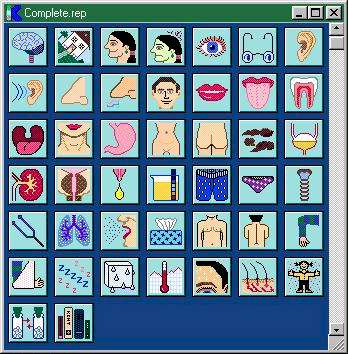
use the “Children” chapter, since two other sections share
the same initial “C”. CARA gives each chapter its own
icon, and therefore improves clarity and accessibility.As you well know, after narrowing down the remedy
selection to a choice of a few, those need to be confirmed in the
materia medica. In general, it is a good and comforting idea to have
the materia medica within easy reach when repertorizing a case. Each
program tries to fill that need and offers you some selection of
well known materia medica texts.CARARADARMacRepertoryCARA offers you a choice of four materia
medicas: Boericke, Kent, Phatak and H. C. Allen’s Keynotes.Custom RADAR keynotes in addition to Boericke
and Allen. The RADAR keynotes are short and concise description of
remedies, sometimes lacking detail.The most extensive list of books available.
Blackwood, Boenninghausen, Boericke, Boger, Breyfogle, Clarke, Guernsey,
Leeser, Lippe, Mathur, Morrison, Nash, Phatak, Pierce, Royal, Schüssler,
Skinner, Teste, Treuherz (Bowel Nosodes), Vermeulen Concordant, Synoptic I
and Synoptic II, Jan Scholten’s Homoeopathy and the Elements as well as
Homoeopathy and Minerals, and two custom compilations: confirmatories and
keynotes.The possibility to expand the repertory by adding
remedies to existing rubrics or enter entirely new rubrics, exists
in every program (except for the bare bones version of RADAR). CARA
has you add new repertory additions to a special user area. RADAR
and MacRepertory incorporate your changes directly into the main
repertory database. In MacRepertory, if your additions become too
numerous, the main index on which all searches are based gets out of
synch and needs to be rebuilt by running a separate utility program
not included on the CD or disks. It is, however, available from KHA,
Inc., free for the asking. How quickly this becomes a concern I was
not able to evaluate.There seems to be a big difference in the number
of books available for each program. This may be of concern to some
people, but to me it made little difference. I never really use more
than one repertory, except for the odd case, maybe. As far as
repertories go, I used either the Complete or Synthesis. Despite
some ideological differences setting those two apart, neither one
limited me in my creativity or choice of rubrics. CARA is the only
program allowing you to search in all installed repertories at the
same time. RADAR and MacRepertory are multi lingual, in that they
give you the option to view the repertory in two languages
simultaneously (if you purchase the multi lingual version of the
book). They also offer single language versions for several European
languages.It never ceases to amaze me, how much information
will fit on a single CD ROM disk. Imagine having all your favorite
materia medica texts, journal articles of old and recent issues, and
then some, at your beckon. Search for any word, combination of words
or phrases and find all instances within seconds. You’d never know
that the computer was combing through the equivalent of many feet
high stacks of books. All programs offer a varying amount of materia
medica information as part of the repertorization program. To
harness the full power of a dedicated materia medica CD ROM,
however, one needs a dedicated materia medica search program. CARA’s
new version, CARA PRO, integrates Similia
into the repertorization program. RADAR allies with Exlibris, and
MacRepertory works seamlessly together with ReferenceWorks. A
comparison among materia medica programs like these will be subject
of another review in a future issue of Homeopathy Online.
Searching for rubrics
Once you decide on a repertory, the next task is
to find the appropriate rubrics for your case. Without the help of a
computer, you have to know your repertory well. True to history,
many repertories are based on J. T. Kent’s organization of his
repertory and present chapters in the familiar head-to-toe sequence
instead of in alphabetic order. There are advantages and
disadvantages to each approach, and both sometimes have related
symptoms scattered throughout the repertory showing up in places you
would have never looked. The computer comes to your aid in that it
lets you find rubrics based on words or combinations of words. The
downside: if you start relying on this crutch too early, you will
never really get to know your repertory; it will always remain a
somewhat distant acquaintance to you.CARARADARMacRepertoryCARA, as the only one of the three, has the
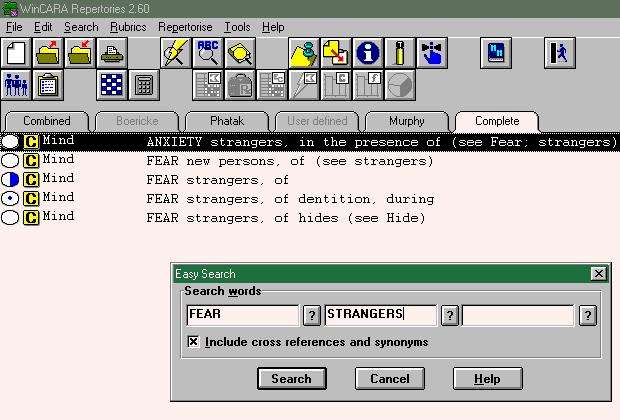
ability to search for rubrics in all installed repertories simultaneously.
After searching for rubrics containing the words “fear” and
“stranger”, the screen looks like this.
Clicking one of the tabs near the top lets you view the particular
matching rubrics in the selected book (in this example the Complete is
selected) – one search found them all.
Notice, that CARA also found “Anxiety, strangers” and
“Fear, new persons”. It did so by looking for synonyms of the
search words you asked for. This comes in handy many times, but can be
turned off if an exact match is desired.
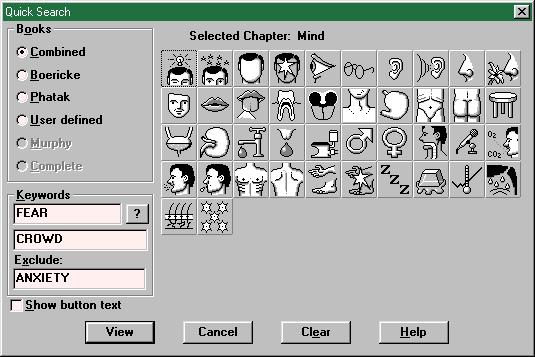
Searches can be limited to a certain chapter in one of the books by using
the Quick Search method. The section on the
right, with all the creative little icons, allows you to select which
chapter of the book indicated by the radio buttons on the left will be
searched. In the screen shot shown I was looking for rubrics (including
synonyms) containing the words “Fear” and “Crowd” but
not “Anxiety”.
If all this intimidates you, the option to browse the books
“manually” from within CARA exists also.When you start up RADAR, you are greeted by a
screen, which looks deceptively similar to your Synthesis repertory –
the book version. This view is highly customizable, with colors, number of
columns, authors, rubric size and more, all displayed to suit your taste.
Want to follow a cross reference? Just double click on it and you are
there. Help finding a rubric is also available.
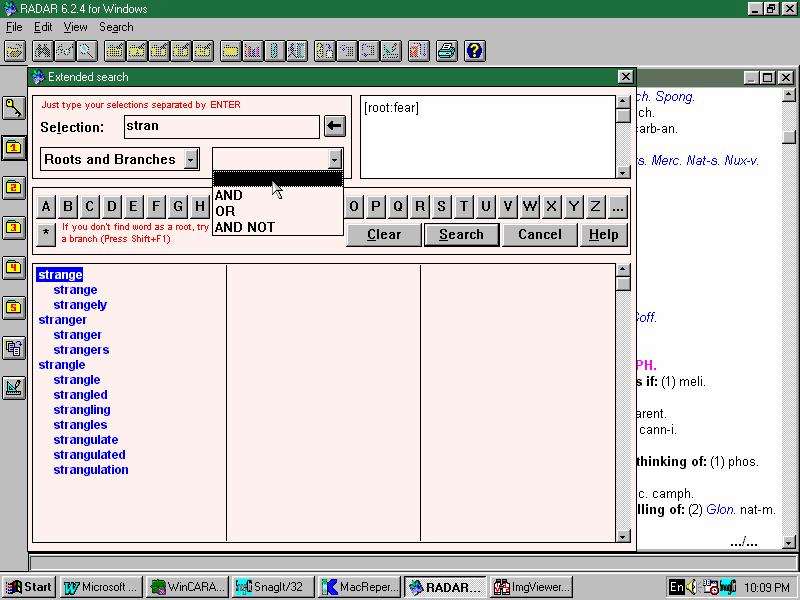
This shot shows the Extended Search feature. I
have to admit that I was a bit intimidated by this, but later I got used
to it, though never 100% comfortable. You type in your search word (or a
part thereof), “stran” in this example, and as you are typing,
the big window with the blue text narrows down to show matching words. You
can have RADAR take what you typed literally or interpret it as a root to
a collection of related words (as in this example). The option to look for
synonyms exists, but to my utter frustration, only the synonyms for words
starting with “A” have been implemented. Therefore, the synonym
search function is non-existent in RADAR.
Different words (or roots) can be connected by “AND”,
“OR”, “AND NOT” to construct more complex searches.Like the other programs, MacRepertory offers
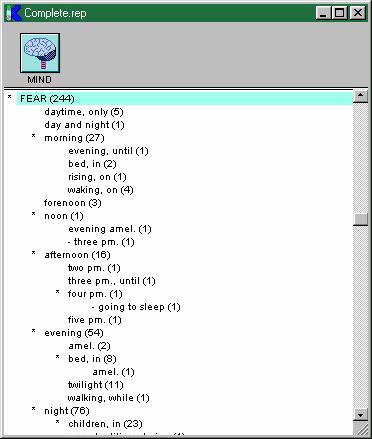
you the choice of either browsing the repertory or using a computer
assisted search. To browse, you first open the repertory of your choice,
and then select a chapter, each of which is represented by a colorful icon. Go ahead and hazard a guess what
each icon stands for! If you are unsure, MacRepertory displays the chapter
names as you hold down the space bar.
The repertory view is highly customizable,
allowing you to show rubric size, cross references, authors, no remedies,
main remedies only or all remedies, various colors and so on. I found the
view with rubric size, cross references and no remedies most comfortable.
If you need to check if a particular remedy is in a rubric, just hold down
the space bar and voila – there it is.
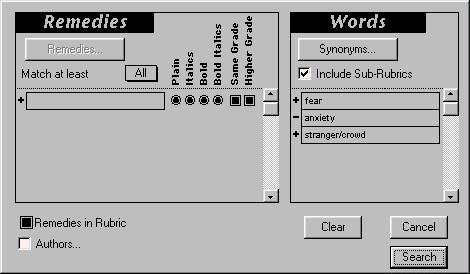
All searching in MacRepertory is done from a single dialog, which I found
both intuitive and functional. To stay with our example, here is how a search for rubrics containing
“Fear” but NOT “Anxiety” AND “Stranger” OR
“Crowd” would be entered. To search for synonyms is pretty easy,
just use the button near the top. In many cases, though, I couldn’t make
heads or tails of the suggested synonyms. Who would have thought of
“epistaxia” and “highly-seasoned” as synonyms for
“fear”?There is more to the search capabilities of each
program than I described here, and some of it will be explained later,
in a different context. All three programs permit you to browse
through the repertory much like you would by hand in your trusted old
book. Their search capabilities, however, are where the power of the
computer shines through. I found myself using the computer search
about 50% of the time, the remaining times I just picked the rubric
straight from the repertory. Being able to search for rubrics by
specifying certain criteria also gave me the comfort of knowing that I
really got all rubrics connected with a particular theme. In summary:
CARA has the most limited search capabilities (which are, however,
adequate most of the time), but it can look through all repertories
and chapters simultaneously. RADAR allows you to do pretty much the
same things as MacRepertory, but in a way that I found less intuitive
to use. It was also particularly annoying to me that the synonym
search was not functioning.As you find the rubrics for your case, you collect
them into clipboards. Each clipboard holds a set of rubrics which can
be analyzed separately later on. This allows you to take a look at
what the mental picture suggests, separately from the physical
symptoms, for example. Simply put all the mental rubrics into one
clipboard and all the physical ones into another. The uses of these
handy clipboards are really manifold, and all three programs have
them. CARA offers three clipboards, RADAR has ten, and MacRepertory
gives you six. In my own experience, anything less than three is too
limiting, but three work fine.The search capabilities are a feature I tended to
use frequently. Therefore, ease of use in this area was a main
concern. The hands down winner in this respect, MacRepertory, makes
browsing and searching the repertory an easy and quick task. Although
search capabilities between RADAR and MacRepertory don’t differ much
in terms of raw capability, I found MacRepertory’s implementation more
intuitive to use. CARA offers an adequate set of search features, but
is the most limited of the three programs. Its list of synonyms,
however, made the most sense. And since it is in the form of a simple
text file, it can be expanded and changed to suit your personal needs.
RADAR’s synonyms were non-existent (although that may be fixed by the
time you read this), and MacRepertory routinely provides outlandish
suggestions, which make me wonder if it really thought of all the
mundane possibilities. Clipboards to collect rubrics for later
analysis are a feature common to all programs.
Concepts in RADAR
There is, however, one area of RADAR, which
deserves special mention. It doesn’t have a direct counterpart in
the other programs, that’s why I am discussing it separately. RADAR
allows the user to search for rubrics by specifying or searching for a
concept. Two different collections of concepts are offered, one
is the “RADAR concepts”, and the other one is based on
Fonseca and Hyltons’s Semiological Guide.The RADAR concepts are essentially just the
familiar allopathic diagnostic disease labels, grouped by organ
system. You can browse them in a format very similar to the familiar
repertory book layout. Double clicking on the
icon following a listing will let you see a brief textual description
or definition of the term. However, I still recommend getting a good
medical dictionary, since the information presented here is very terse
indeed. Theicon gives you instant access to a
list of specific rubrics describing the general complaint. Most of the
time there are also a few remedy suggestions. So you will find under
“Anxiety Neuroses-Plan of Action-Remedies”: acon, ARS, calc,
phos, puls, sulph. How and why these remedies have been singled out
from among hundreds of other – equally likely – candidates, eludes
me. As useful as the general information presented may be, the remedy
suggestions are, at best, misleading. Whatever happened to
individualization and prescribing on the basis of the totality of the
patient?Saving the best for last, let me tell you about
Fonseca and Hyltons’s Semiological Guide. And a true guide it
is. It leads you to a set of specific rubrics, starting with very
general concepts becoming ever more specific. In essence, this is a
powerful tool, which helps you translate the patient’s language and
your own observations into repertory language. To illustrate, take the
symptom of “fear of other people”. Which rubrics might we
consider here? The semiological guide leads us down a path of choices:
Analogic group à in relation to others à Fear of people à
intimidation, timidity à intimidated by
strangers. At this point, the guide offers you a list of rubrics which describe this state.
Double clicking on theicon zaps you to the
corresponding rubric in the repertory. Of all additions to RADAR, I
found this to be the most useful one, appealing to the student as well
as the more experienced prescriber. The rubrics suggested by the guide
include, of course, the more obvious choices but make also use of
lateral thinking and creative interpretation of the repertory.
Case analysis
Here is where having a computer really saves you
time. However, the speed with which the computer suggests a remedy to
you bears an element of danger. It is deceptive, because one tends to
forget that no amount of whiz bang will give you the right remedy from
the wrong selection of rubrics. The principle of GIGO
(garbage-in-garbage-out) applies here more then anywhere else. Before
describing the analysis capabilities of each program, let me explain
briefly what analysis strategies are.Probably the most common way to analyze a case is
to take into account the grade of the remedy and the number of rubrics
it appears in to compute a final “score”. One can modify
this, by taking into account the “underlining” (i.e.
importance of each rubric to the case) as well. Invariably, however,
small remedies will not fare well with either of these strategies.
They are underrepresented in our repertories and therefore are
statistically less likely to show up in a repertorization, even though
they may be the simillimum. To compensate for this, one could try to
level the playing field by attaching more significance to a small
remedy when it shows up in a rubric than to a polychrest. Among the
factors to consider when repertorizing is also the size of each
rubric. A large rubric containing 100 or more remedies has
comparatively little differentiating power, whereas a carefully chosen
small size rubric gives you the ability to narrow the field of
remedies considerably. In many cases it may therefore be advantageous
to weight smaller rubrics more than larger, more common ones. So you
see that rubric size, remedy grade, symptom underlining, and the
frequency of the remedy in the repertory all factor into the
repertorization and final ranking of remedy choices. There are many
more factors one could take into account to fine tune the process of
case analysis even further. Consider, for example, remedy families. If
in a case you find Phosphorus and Kalium salts well
represented, then Kali-phos should be given special
consideration. These and many more strategies can be applied
automatically by the computer.An important part of the case analysis is the
ability to restrict your attention to only a certain class of
remedies, e.g. the minerals, snake remedies, remedies belonging to the
sycotic miasm, etc. Sometimes I found myself in a situation, where all
I saw was polychrests. In this case, it is a great help to be able to
simply tell the computer not to show any polychrests and exclude them
from the analysis. The programs differ greatly in their ability to
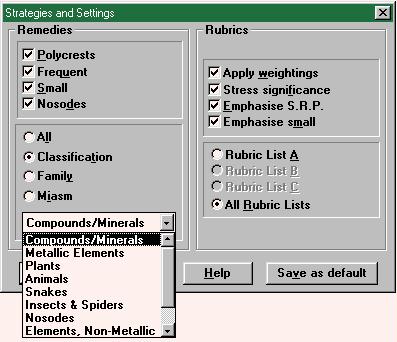
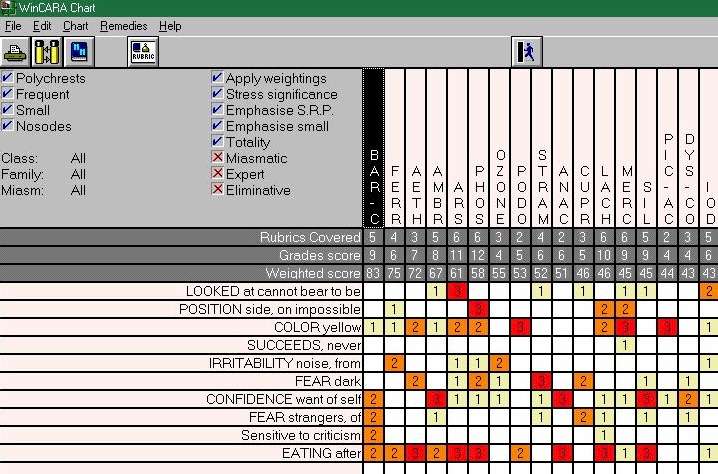
specify exactly on which remedies the analysis is to be performed.CARARADARMacRepertoryChoose your strategy from this screen. The right hand side is labeled
“Rubrics” and allows you to select the appropriate combination
of strategies for your case. The four choices represent the four simple
strategies which are based on underlining, prominence of a particular
remedy in a rubric, rubric size, and frequency of the remedy (i.e. how
well is the remedy represented in the repertory).
CARA sports a so-called “expert system”, which really is only a
predefined mix of the aforementioned basic analysis strategies. If you
feel so inclined, you can change this mix to adapt it to your specific
needs.
Apart from the strategy, CARA allows you to consider only certain classes
of remedies in the analysis. The selections are made on the left of the
screen. As the check boxes near the top show, you can include remedies
based on their frequency (polychrest, frequent, small) and whether they
are nosodes. Further down, you can define the remedies you would like to
consider for the case, according to their natural classification (as shown
by the drop down menu), by their chemical family, or their relationship to
a miasm,Similar to CARA, RADAR gives you a set of basic
strategies, which you can mix in different proportions by dragging sliders
denoting their weight in the final analysis (click here for a screen shot). A much advertised feature of RADAR
is its “Vithoulkas Expert System” (VES), which supposedly is
tailored to the thought process of George Vithoulkas. You can easily
select the VES option from the analysis screen and then get assistance
from George’s “spirit”. The assistance takes the form of showing
you the leading remedy as well as other remedies you should consider and
ask questions about (here’s a screen shot of VES in
action). In a separate window, VES shows you
how it rates different remedies in the case. Proper underlining is
essential for this to work, and VES will not hesitate to tell you about
shortcomings in your symptom selection (e.g., add more modalities, too
many underlined symptoms, etc.)
RADAR gives you the option of limiting repertorization to select remedies
and groupings (e.g., miasms, natural families, chemical composition,
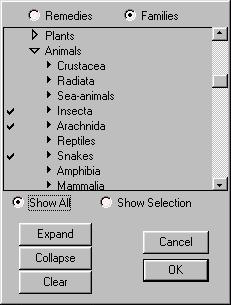
etc.). To display only insects, snakes and spider remedies, you would be
looking at this screen.MacRepertory is uncontested in flexibility of
choosing a repertorization strategy. In fact, its capabilities are so
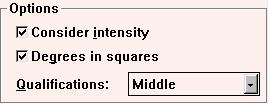
encompassing and powerful, that I can’t name them all in this space. Click here to see the screen that I turned to
often in order to fine tune my analysis. From the eight strategies shown,
each emphasizes one or the other aspect of repertorization technique, so
that the over all analysis strategy is a combination of all eight,
weighted according to the slider position.
The colorful bar graphs next to the sliders show you how the remedies
score if the respective strategy were used solely. In the example screen
shot, we learn that boosting small remedies will lead to a flat score,
with little information to distinguish between the top scoring remedies.
Each color in the bar graph corresponds to a particular family (dark blue
being salts and green being plants, and so on). It almost goes without
saying that you can design your own strategies and save them for future
use.
In terms of limiting the analysis to a selection of remedies, MacRepertory
leaves no wish unfulfilled. You can exclude a presettable number of
polychrests, or limit repertorization to any selection of individual
remedies or natural families. As an example of
how to make your selection, here is how to restrict repertorization to
spiders, insects, and snakes. Other ways of classification exist (e.g.,
miasms) and you can even define and save your own families. And most
importantly, the entire process is simple and intuitive!Again, I found that CARA’s feature set of analysis
strategies and options is sufficient in many circumstances. What RADAR
adds on top of it, is its Vithoulkas Expert System (VES) and much
expanded capabilities in terms of selecting remedies by family.
MacRepertory is, however, the easiest and most straightforward system
to use in this respect. In terms of fine tuning and selecting
different case analysis strategies, it offers more than the other two
programs. Selecting remedies by family and restricting repertorization
to certain families is a breeze. Even though RADAR gives me a similar
level of control, it feels a bit rough around the edges. Counting the
number of mouse clicks necessary to perform a certain task in RADAR,
it seems always to be that much more difficult and less intuitive than
in MacRepertory.As to the expert systems. The one in CARA is simply
a fixed analysis strategy, which has been honed on a large number of
cases. The term “expert system” is, in my opinion,
inappropriate. On the other hand, CARA performed well and suggested
reasonable remedy choices using the “expert” analysis. Most
of the time, I would look at a case using this setting as well as a
simple “flat” repertorization. RADAR’s VES is touted to be
akin to having George Vithoulkas looking over your shoulder. I can’t
attest to this, since George has never looked over my shoulder, but I
can see how it may be attractive to some users. Personally, I found
that I preferred most of the intelligence to remain under my control
and didn’t use the VES frequently. This may to a big part be due to my
not using underlining in the manner necessary for the VES to show off
its best side.MacRepertory undoubtedly gives you the most control
over the repertorization strategy. Everything is customizable and
adaptable to your needs. The sheer number of possibilities can be
confusing to the user, but fortunately all but the most frequently
used controls are well hidden from plain view. This, I felt, gave me
the control I wanted when I needed it, without being right up in my
face with every little feature.Both RADAR and MacRepertory offer specialized
analysis features which draw upon the experience and techniques of
several well known homeopaths. I already mentioned RADAR’s Vithoulkas
Expert System, but there is also the Vakil and Herscu modules
available. See further down for a brief description. MacRepertory
extends its suite of analysis strategies by categorizing remedies into
groups such as the five elements, or astrological planets, etc. More
about this later.
Presentation of the repertorization
As any statistician will attest to, no data is
worth its paper unless it is presented in a way that brings out the
message it is trying to tell. What I was looking for in particular was
the ability to manipulate the rubric information (e.g., changing the
underlining, combining rubrics, substituting other rubrics, etc.),
change the analysis strategy, and zoom in on a specific group of
remedies (e.g., snakes, acids, solanaceae, etc.) while being able to
see what impact my manipulations have on the repertorization.CARARADARMacRepertoryCARA offers a basic, no frills graph, which presents rubrics and remedies in
ranked order according to computed score. How the score is calculated
depends on the analysis options chosen.
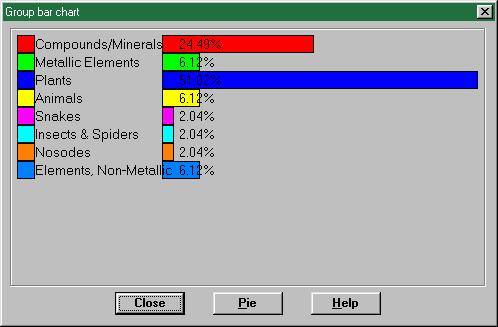
To help you recognize trends and patterns in the data, CARA allows you to
do a simple statistical analysis on the frequency of families occurring in the repertorization.RADAR’s version of the basic graph looks like
this. A way to look at all the analysis strategies
simultaneously and compare them is also available. The program’s
capabilities in analyzing the data according to remedy families are
extensive. One way to do this, is by walking through the botanical or
zoological hierarchy. Unfortunately, the minute subdivisions of the
species requires a biologist to make heads or tails of. In one instance I
wanted to get to Ranunculus bulbosus. I had to click myself through 10
levels of hierarchy: starting at Plants, botanical families, phanerogamia,
angiosperma, dicotyletones, polypetalae, thalamiflorae, ranales,
ranunculales, and finally ranunculaceae. Then, once there, you realize
that of the remedies shown, all but one belong to families BUT the
ranunculaceae! Chel, Op and Sang are papaveraceae, Raph
is a cruciferae, Cist belongs to the cistaceae, and Viol-t
to the violaceae. Is this a programming error or a bug in the beta
version?Click here to see
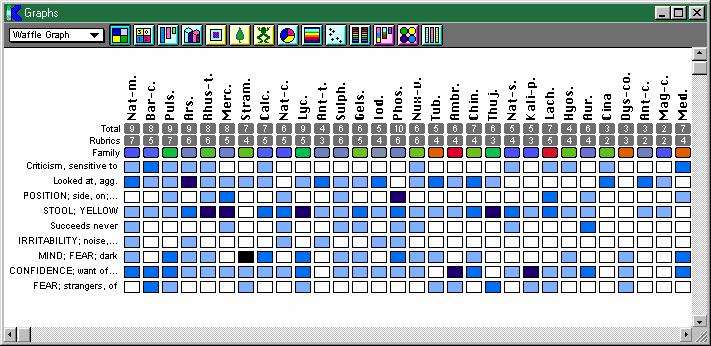
what your basic graph in MacRepertory looks like. This, my dear friend, is
but the tip of the iceberg. There are more graph styles in MacRepertory
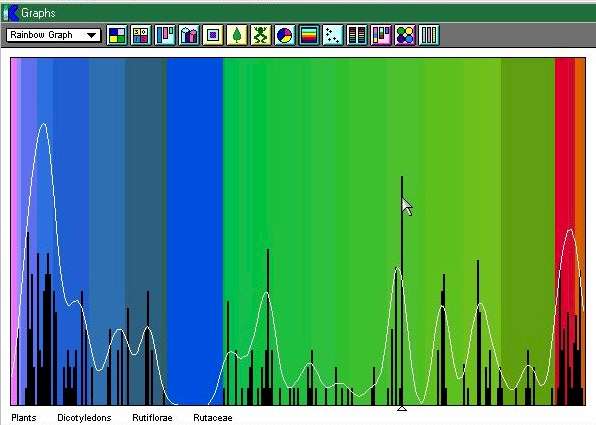
than bees in a bee hive. Some of my favorites are the Multigraph, which shows which remedies come
through when you use different strategies; and the Scattergraph,
which is a way to represent the result of applying up to three different
strategies simultaneously. The Rainbowgraph is
decidedly one of the more esoteric representations, though. You can let
your creative juices flow and even design your own graphs.
What I found missing in MacRepertory is the ability to analyze your
repertorization statistically according to families.Most of the time I used the simple graph type
common to all three programs. In terms of comparing different analysis
strategies and finding the best approach to interpreting the
repertorization, MacRepertory’s full suite of graph styles is hard to
beat. Much more important than that, however, is the ability to play
with the case and see how that affects the repertorization.
MacRepertory’s graphs are linked “live” to the rubric
clipboards. Any change you make there (e.g. underlining, or selecting
certain rubrics, etc.) will be reflected immediately in the graph. To
me, this immediacy promotes an intimate interaction with the case,
which more than once showed me the right way to the simillimum.
Although RADAR has, in principle, similar capabilities, the intimacy
is lacking. You have to switch between different screens, which are
several mouse clicks apart from each other to see the result of any
changes in rubrics reflected in the analysis. CARA offers basic
graphing features together with simple statistical tools. As bland as
this may sound, in practice, few cases required much more than that.
Printing and exporting information
Call me old-fashioned, but I belong to the
generation which still keeps hardcopy printouts of all cases in
addition to the case files on my computer. Both CARA and RADAR had
problems printing to my HP DeskJet 682c. The complaints ranged from
spewing gibberish, to spurious complaints that the printer driver is
corrupted (which it isn’t), all the way to crashing my computer. The
source of these errors is very likely the copy protection devices
(“dongles”) that all three programs stubbornly require to be
connected to the printer port. With a bit of fiddling and accepting
more frequent reboots I was able to coax the programs into giving me
what I wanted most of the time. When I succeeded, all three programs
generally produced a printout resembling closely their respective
graphs on screen, color and all.Many practitioners have the need to document a case
for presentation at a study group, a journal article, or a seminar. If
you are like me, you will want to write the article on your favorite
word processor and “stick in” the graph from your analysis.
A very crude way of doing this is taking a snap shot of the computer
screen with the information you care about displayed. You have to trim
the picture to size and cut way unwanted regions. This is a crude
approach. Unfortunately that’s your only option in RADAR. CARA and
MacRepertory allow you simply to cut and paste between the program and
your word processor or spread sheet. I was able to write up a case
including rubric information and analysis graph quickly and hassle
free in this manner.
Materia medica studies
I didn’t know it at first, but repertorization
programs make great tools for studying remedies. It’s a breeze to
extract rubrics for several remedies at the same time, and then
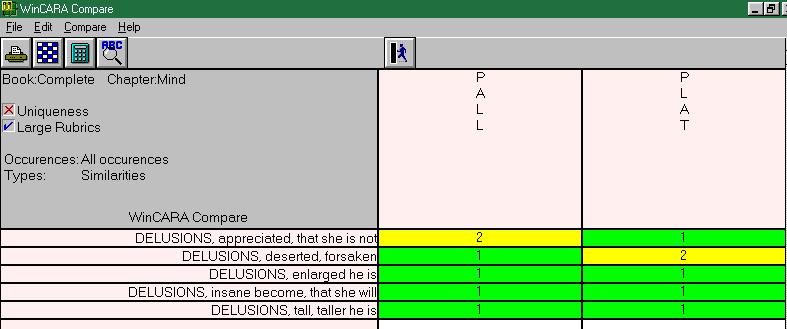
compare and contrast them. Here’s an example: Platinum and Palladium
are chemically related metals. How does this observation reflect in
their respective delusions? To research this by hand would require to
go through the entire chapter on delusions in the repertory and write
down any rubric in which both remedies appear together. Did I hear you
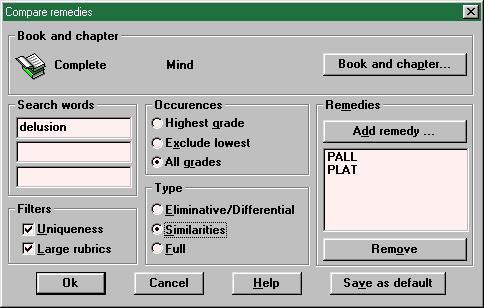
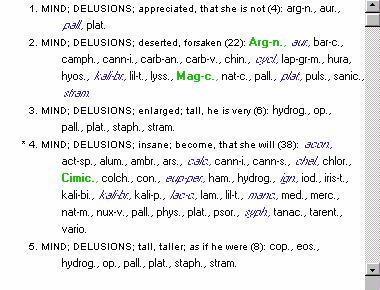
sigh? Fear not! Let the computer be your aid.CARARADARMacRepertoryIn CARA you have to go to the Compare Remedies tool, which lets you perform this
task easily. If you are curious, here’s what the result
looks like.
You can specify whether you want to find rubrics in which both remedies
occur, or in which only one is listed, which is useful to educate yourself
about how the two remedies differ. These comparisons can be extended to
five remedies. However, you can only search one chapter of a repertory at
a time.
Other settings let you ignore overly large rubrics or focus on specific
grades of a remedy.You have considerable flexibility to define
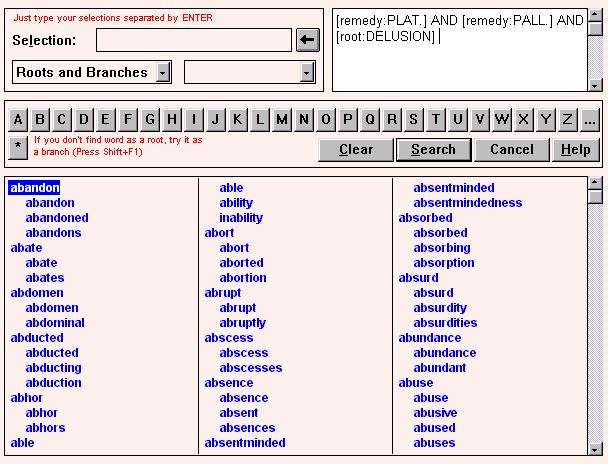
your search in RADAR. Combining words in the repertory with remedies and
linking them with different logical operators (AND, OR, AND NOT) lets you
build complex search criteria. For this specific example, the input shown here will produce this result. Double clicking on a rubric opens the
repertory at the correct place. However, there is no way to go back to the
search results and peek at another rubric.
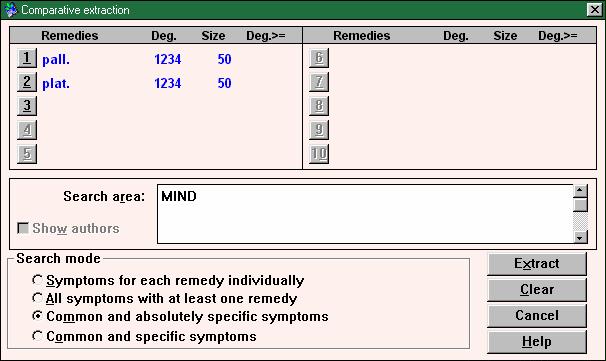
Another way to extract information about remedies and compare them is also
available. You can specify up to 10 remedies, set the maximum size of
rubrics to be considered, and the chapters of the repertory to comb
through. Then you can choose from among four different comparison methods.
In this example I am finding the rubrics in the
Mind chapter of Synthesis with fewer than 50 remedies, in which Pall
and Plat both appear. The result presents the rubrics, rubric size,
as well as the degree in which each of the two remedies is listed in each
rubric.All searches in MacRepertory are easily
performed from a single dialog. The results are
piped into a rubric clipboard of your choice and can be viewed easily as text or in graph format.
This dialog box gives you all the control over remedy and rubric searches
you’d ever want, and I found it easy and intuitive to use.Let’s try a more complicated demonstration of how
you could use the search capabilities to study remedies. Say, for
example, you want to hunt for the “essence” of Magnesium. Is
there something common to all magnesium salts? If so, what is it?
There are about 10 magnesium salts in our materia medica. Any rubric
which contains three or more should be considered as a possible
element common to all magnesium remedies. To throw out large,
nondescript symptoms, let’s narrow our search down to include only
rubrics of 50 remedies or less. Clicking on the button labeled
“Remedies” in MacRepertory’s search
dialog allows you to select the Magnesias, whereas the pop up menu
shown gives you a handle on the rubric size. You can even restrict
your search to certain authors, if you like, or rubrics containing
particular words. The sky is the limit. RADAR has the same
capabilities, but you can’t specify the author(s) as a search
condition. Also, in the case of the Magnesias, I would have to enter
each one of them separately, which makes this kind of family
extraction unwieldy. In addition, I was not able to tell RADAR to find
rubrics containing any 3 out of all 10 Magnesias. To perform a family
analysis, therefore, is more difficult in RADAR. CARA does not support
searches by families.Incidentally, there are 96 rubrics in the Complete
which contain at least 3 of the magnesium salts and have less than 50
remedies in total, 16 of them in the Mind chapter.
Patient charts and case management
As one follows a case over a period of time, there
is a lot of information that needs to be recorded from visit to visit.
Wouldn’t it be handy, if all the information pertaining to a patient
could be stored in one file, easily accessible and amendable? You can
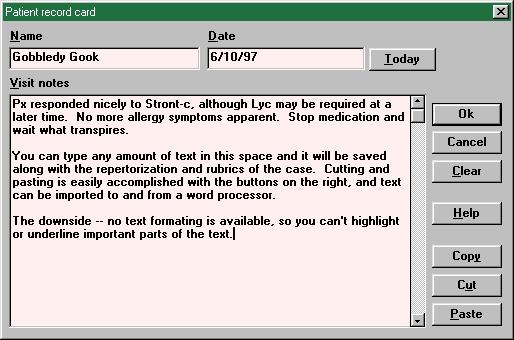
rest calmly, all three programs provide some way of doing just that.CARARADARMacRepertoryA simple window keeps
patient information, date of the visits and miscellaneous notes handy
for you in one place. Along with the rubrics and repertorization for a
case, you can save your own notes. Cutting and pasting into other programs
is easily possible. The downside: for each visits you will need to start a
new file. Therefore it is cumbersome to see the continuity and development
of a case, since you have to close the one you are looking at to open
another one.All the information of your entire clientele is
stored in one file. You can get a list of your clients and then choose one
to open. This gives you access to all consultations with this client,
his/her personal information as well as rubrics
and an arbitrary number of repertorizations. The possibility to attach a
simple text file is also provided.
On the downside I have only the complaint that all consultations of your
entire clientele are kept in this one file. For a busy practice, this will
quickly become too much for to handle easily in one file. Instructions how
to start a new file seem complicated. I would much rather have one file
for each patient, which holds all the information. This is how
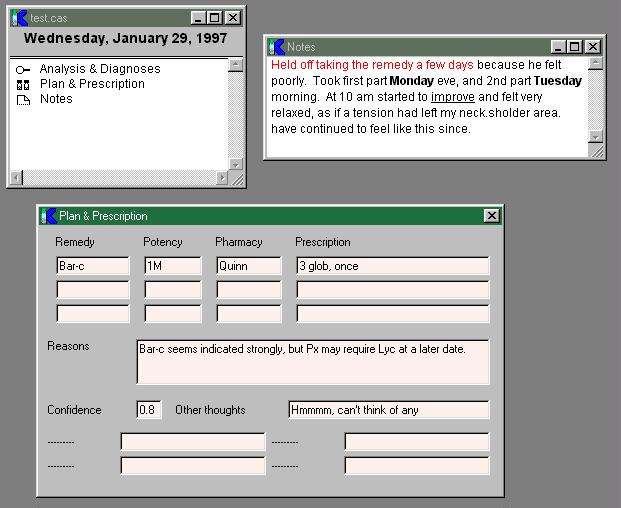
traditionally patient charts are organized – and for a reason.MacRepertory allows you to keep track of each
patient in his or her own file. The patient file essentially becomes the
familiar manila folder, containing case notes, rubric information, graphs,
diagnoses, therapy, etc. You can save pretty much anything you want in the
patient file. In this screen shot you see the
main window for the particular visit, with several typical entries. Two of
those, the Notes and Plan & Prescription, are open. As you can see,
text can be highlighted in a variety of different styles to draw your
attention to the important parts. I also liked the way MacRepertory
organized the different entries and groups them into each session. You can
export all or part of the information to other programs from here easily.In principle, you can type your case notes right
into the computer in front of the patient. I know several people who
do just that, although I don’t do it personally (for one, I am not a
good enough typist). You would thereby eliminate the need for a sheet
of paper completely, and come a step closer to the paperless office.
RADAR has just started to offer, as separate modules, an extensive
patient information database system. I saw a brief demo at the IFH
conference this May and was assured that it would fit seamlessly into
the repertorization and analysis part of RADAR. Its capabilities
include patient management, information tracking, follow up sessions,
as well as charting trends of certain parameters. If it lives up to
the promise, these modules would constitute the most detailed patient
management system of all three programs – at an additional price, of
course.
Special features in RADAR
In addition to the Vithoulkas Expert System, RADAR
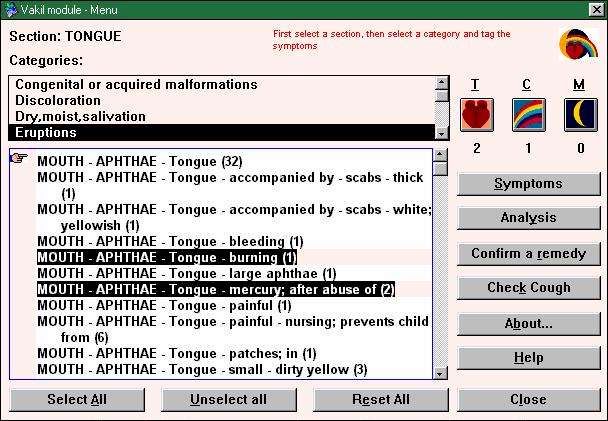
offers you the distilled wisdom of Prakash Vakil and Paul Herscu.
Vakil focuses on the differentiation between remedies using the
appearance of the tongue, colors and moon phases. At any stage during
case analysis or remedy differentiation, one can use additional
rubrics and symptoms pertaining specifically to these three chapters.
These additional rubrics pertaining to tongue, moon and color are in
part additions by Vakil himself, based on 30 years of research. Vakil
claims that differentiation between similar remedies based on these
three chapters with the additional information he provides makes
remedy selection more certain and quicker. Part of the Vakil module is also an audio recording of
coughs characteristic for certain remedies. There are 10 different
coughs one can listen to and view a short description of the patient
who was recorded. Unfortunately, the recording quality is so poor that
I found this feature of little value.With version 7.0, I could see a definite commitment
of RADAR to multi media techniques. This shows in the 20 or so images
of remedies which are part of their keynote description, the one
lonesome video clip of nystagmus, and Vakil’s cough module. The
information as it stands now is still terribly incomplete, and was
therefore of no real value to me. However, I realize that RADAR has
just begun to move in the direction of multi media, and future
versions will hopefully expand on the beginnings made in this version
of the program. It is certainly a feature which has the potential to
be of great use and one which distinguishes RADAR from both of its
contestants.Next to Vithoulkas and Vakil, Paul Herscu has lent
his wisdom to RADAR. The Herscu module provides an interface to
Herscu’s case analysis approach. It would be too much to describe its
features here, but I can only recommend to read Herscu’s new book.
Based on my personal style of case analysis, I found the Herscu module
enlightening and easy to use. It has the potential of providing a new
view on an old case, which hitherto proved resistant to any other
strategy.
Special features in MacRepertory
MacRepertory, too, offers you the particular
insights of some well known homeopaths. You can look at a case through
the eyes of William Boyd’s groups, Robin Murphy’s planets, Vega
Rozenberg’s boxes, and Berkely Digby’s five elements. All these
schemes are different ways to classify remedies – in essence, each
is a way of dividing remedies into families. Murphy uses the planets
of the solar system, Digby bases his classification on the five
alchemical elements, Earth, Water, Fire, and Ether. You can analyze a
case in each system and therefore conclude, e.g., that a particular
case has a preponderance of Water symptoms. A brief description
accompanies each system, but is in no way sufficient to start using it
with any measure of confidence and competence. People who have either
studied with these homeopaths or are familiar with their writings will
probably welcome this feature of MacRepertory most. For the rest of us
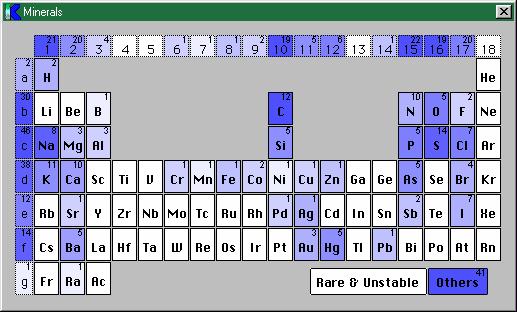
it isn’t going to do much.One are where MacRepertory really shines is the
analysis of a case based on natural families. With only two mouse
clicks you see your case projected onto the periodical
table of elements and can easily locate the center of gravity and
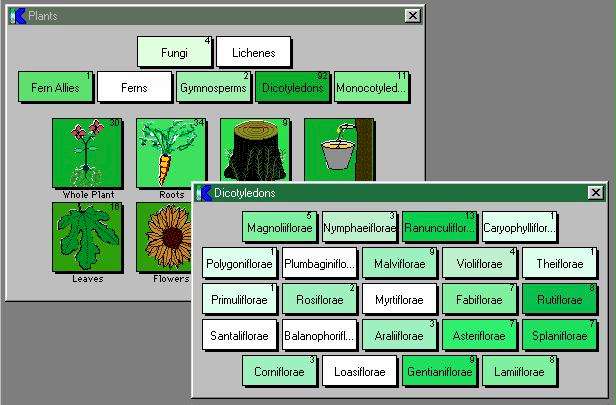
likely remedy relationships there. Or, maybe, you suspect a plant
remedy and want to see which botanical families the repertorization
favors. Nothing easier than that. You can view the botanical families in hierarchical order,
while the darker shades of green show you where the repertorization
falls. I really enjoyed playing with this part of the program, not the
least because the pictures are well done and fun to look at. Besides
chemical and botanical relationships, there are several others you can
explore in a similar fashion (e.g., zoological or miasmatic).
CARA PRO on the horizon
It is true that CARA, version 2.61, is the latest
version your money can get you right now. However, it is older than
the other two programs’ latest versions, both of which having seen the
light within the last month or so. When you read this review, very
likely there will be a new version of CARA already available, CARA
PRO. Therefore I feel that some preliminary information on CARA PRO is
necessary, even though I was not able to test it. What I am telling
you of CARA PRO comes from the mouth of David Witko, the programmer
himself.CARA PRO comes with a full fledged materia medica
search engine already built in. This search engine, a program named
Similia, was previously available only separately. Now it has become
an integral part of CARA PRO and offers many classical as well as
contemporary materia medica texts. As the second player in the multi
media field, after RADAR, CARA PRO supports the display of color
remedy images and playing of audio and video clips. David Witko claims
that full color photographs of the remedies are included, but how many
and of which quality remains to be seen. There will also be spoken
text on some remedies by a few of the world’s leading homeopaths.Apart from that, CARA PRO will also offer a new
repertory search method, which is by “theme”. This sounds
reminiscent of RADAR’s semiological concepts. The appearance of rubric
presentations has been improved, so that CARA PRO on screen looks like
your familiar repertory book. In addition, it appears that several
previous limitations of the program have been removed and enhanced.CARA PRO will be available on CD ROM as well as
floppy disks and be fully supportive of Windows 95. Later, a version
for the Macintosh is also on the schedule. If you can’t wait, you can
wet your mouth with screen shots of CARA PRO on Miccant’s web site: http://www.miccant.co.uk/preview.htm.
The gist of it
So what does it all boil down to? Well, here is my
personal Pro/Con list to help you make up your own. Before deciding, I
would urge you strongly to speak with a sales representative, since
pricing, features, and available books tend to change quickly.CARA 2.61RADAR 7.0bMacRepertory 5.2ProsOnly program which lets you search all
installed repertories simultaneously.
Good manual and on-line help.
All around a great value.Offers a multi-lingual Synthesis, which lets
you view the repertory in two languages.
First attempts to bring multi-media experience to homeopathy.
Good set of features.
Unique way of employing analogical concepts in translating patient
language into repertory language.
Great on-line help, which offsets the mediocre manual.Easiest to use of all programs, with the most
consistent user interface.
Seamlessly integrated remedy families.
Most versatile and powerful search feature.
Powerful and extendable suite of case analysis strategies.
Extensive and customizable set of repertorization graphs.
Good integration of patient data and charts.ConsBasic, no bells and whistles, feature set.
Difficulty printing (in my set up).
Feels a bit rough around the edges.
Does not adhere to Windows user interface guidelines.User interface is inconsistent and awkward in
places, making some features unnecessarily difficult to use.
Synonym search not implemented.
Only Synthesis as repertory available.
Export of repertorization graphs into other programs difficult.
Does not adhere to Windows user interface guidelines.No on-line help.
Extensive user additions to the repertory require a separate program to
rebuild the search index (available free from KHA).
Follows Macintosh user guidelines, not Windows guidelines.
Awkward implementation of Murphy’s repertory.Contact
infoMiccant Ltd.
14 Mulberry Close
West Bridgeford
Nottingham, NG2 7SS
U.K.Archibel Software
Rue du Pourrain 73
B-53330 Assesse
BelgiumKent Homeopathic Associates, Inc.
Beth Niles, Sales Manager
710 Mission Avenue
San Rafael, CA 94901
U.S.A.Phone:
+44 (115) 945-5289+1 (905) 513-0619+1 (415) 457-0678Base
priceWith Kent, Combined, Boericke,
Allen, and Phatak included:
$750
(call for most current pricing)With Synthesis, but without the
ability to make additions to the repertory and without the patient file:
$895
(call for most current pricing)With Kent and Morrison’s
Keynotes:
$1,386
(call for most current pricing)Fully
loaded priceWith additional Complete and
Murphy’s repertory:
$1,125
(call for most current pricing)With Vithoulkas expert system:
$2,750
(call for most current pricing)Full complement of books as
described above:
$3,399
(call for most current pricing)Pricing information is subject to change, and
student or group discounts are sometimes available. Prices may also
differ in other countries. Therefore, I strongly urge you to contact
the companies for a local sales representative and current pricing. Be
careful when comparing the prices from the table above, since they are
really apples and oranges. What they tell you is how little (or how
much) you can get the program for. Also, be sure you know what you are
getting. The base versions may give you less than you need in
practice. I, personally, would want an extensive repertory (Kent, in
my opinion, is not enough for a professional practice today) and
access to modern materia medica and keynote information. What you need
may not be the fully loaded version, but actually something in between
the bare bones and the deluxe. Don’t be shy, call the company and ask.
In most cases you can get what you want without having to buy into
something you don’t want.All three programs are also offered in a
“Lite” version, which, essentially, is a stripped version of
the program with only Kent’s repertory. Prices run in the neighborhood
of $500, and trade-up offers to the full versions exist for a limited
time after purchase. However, think twice before going this way. If
you really need a program, chances are you won’t be satisfied with the
feather weight. If you can’t afford to shell out the money for the
full version, don’t go and buy the light one; save some more and go
the whole nine yards.The software field, like no other, is developing at
such a rapid pace, that features only dreamed of yesterday are already
being implemented today. Areas where you should expect some major
advances in the near future are multi-media and repertory searches by
themes.Homeopathy has seen significant new development in
the recent past. For example, we are now starting to build a bridge
between the remedy source and our remedy images. Jan Scholten, with
his latest book Homeoathy and the Elements has been a leader in this
area, but others have worked along similar lines in the area of botany
and zoology. It is easy to give a computer the capability to
incorporate this into the repertorization and case analysis. The
harder part is up to us, though. As homeopaths we have to educate
ourselves and become familiar with these new tools. We have to learn
how to wield the electronic power properly. Therefore I see the
biggest potential of computers in that their raw computing power will
stimulate growth in the community and eventually make us all better
homeopaths.Copyright ©
Chris Kurz 1997